
TopDeck.gg
TopDeck.ggEvents
4.717.00 Reviews
- Version
- 2.2.0
- Installs
- 10.00K
- Age Rating
- Everyone
Screenshots
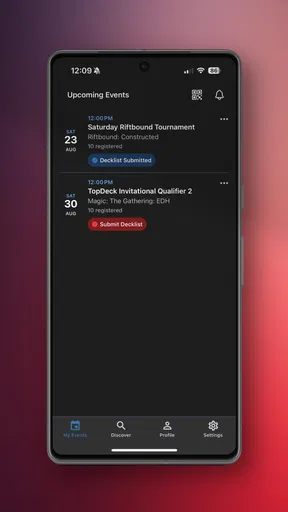
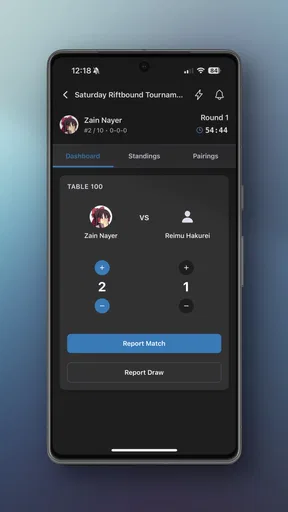
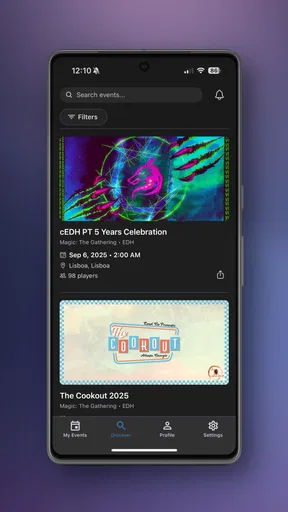
Our Review of TopDeck.gg
 Analysis by Appyee
I approached TopDeck.gg as an event companion rather than as another general-purpose social app. It is a free Android app from TopDeck.gg in the Events category, aimed at people who need a practical place to follow tournament activity. That focus matters: the app makes the most sense when I already care about a competitive event and want tournament information close at hand, rather than when I am simply browsing for entertainment.
My overall impression is positive, especially for players and spectators who regularly move between rounds, schedules, and event details. The app has a clear purpose, and its current version, 2.2.0, feels like a focused tool instead of an overloaded platform. At the same time, a tournament hub is only useful if I can read it quickly, understand where I am, and use it comfortably in a noisy venue or while carrying other equipment. That is where the experience becomes more nuanced.
How the tournament experience holds up in real use
I find the tournament-focused approach most useful when I treat the app as a quick reference, not as my only source of updates. In this section, I’ll look at how that focus affects real event-day decisions, including when a phone check is enough and when I would still ask a person for clarification.
Readability and navigation when time matters
The strongest part of TopDeck.gg is its narrow focus. When I open an event app, I do not want to work through unrelated feeds or promotional layers before finding the competition I came for. A dedicated tournament hub gives the information a natural priority: the event itself, its status, and the details needed to follow it. That makes the app easier to understand than a broad community platform where tournament information may be scattered across posts, chats, and external pages.
This is particularly useful during a busy competition. Imagine arriving at a venue, checking the next stage of an event, and needing to confirm what is happening before walking across the room. In that situation, every extra tap and every ambiguous label creates friction. TopDeck.gg is at its best when I use it as a quick reference point rather than as something I study for long periods.
The app’s store rating is a 4.6 average from around 91 ratings, which suggests that its focused approach is working well for the people who have tried it. I would not treat that number as proof that every tournament workflow is perfect, but it does support the impression that the app is meeting a real need for its audience. Its reach is still relatively modest, with over 10 thousand installs, so I see it as a specialist tool rather than a universal event platform.
For readability, the most important habit is to check the screen before entering a high-pressure moment. If I were using it between matches, I would open the relevant event in advance, confirm that the information I need is visible, and avoid waiting until I am already being called. This is not a criticism unique to TopDeck.gg; it is a sensible way to use any tournament application. Still, a focused app should support that habit by keeping the route to essential information short and predictable.
People with different reading needs may appreciate the limited subject matter, because a smaller information scope can make an interface feel less mentally demanding. Someone who finds dense event pages tiring can concentrate on one competition instead of filtering a large social feed. However, a focused purpose does not automatically guarantee ideal readability for everyone. Text size, contrast, spacing, and the amount of information shown together still determine whether the app is comfortable for a particular reader.
Motor and sensory considerations in a tournament venue
Using an event app is often different from using one at home. At a tournament, I may be standing, carrying a bag, sharing a table, or trying to check information while people are talking around me. That changes what “easy to use” means. A screen that feels perfectly manageable in a quiet room can become difficult when I have only one hand available or when I need to glance at it quickly.
TopDeck.gg benefits from being a purpose-built destination, because I am less likely to wander through unrelated content. That can reduce the number of gestures required to reach a useful screen. For users with limited dexterity, fewer unnecessary movements are valuable. I would still recommend setting up the app before the event begins, since preparation reduces the need for repeated searching, rapid tapping, or awkward one-handed interaction later.
A practical workflow is to identify the event I care about, review the relevant information while seated, and keep the phone ready for short checks. This is more accessible than trying to learn the interface in the middle of a round. It also helps users who experience visual fatigue, attention difficulties, or sensory overload, because the app becomes a reference tool with a defined purpose rather than another stream demanding constant attention.
There is a trade-off here. A tournament companion has to show enough detail to be useful, but too much detail on one screen can make scanning harder. If I am looking for one specific item, a compact layout is helpful. If I need a broader view of an event, switching between screens can become inconvenient. The better choice depends on whether I am following one competition closely or comparing several pieces of information at once.
For users sensitive to visual motion, sound, or crowded interfaces, I would judge the app by the actual presentation on their device and by the conditions in which they plan to use it. The app’s event focus is encouraging because it avoids the sensory burden of a general social network, but I would not assume that a specialized purpose solves every sensory concern. A quiet setup, lower screen brightness, and advance preparation may make a bigger difference than the app alone.
Situational access for players, spectators, and organizers
The most obvious audience is the competitive player who needs tournament information without relying entirely on conversations happening around the venue. That independence can be important. If I miss an announcement or cannot hear someone clearly, having a central event reference gives me another way to orient myself. It is also useful for spectators who want to follow the structure of an event without standing beside an information board.
TopDeck.gg can also help a friend or family member who is attending a tournament but does not know the community’s usual routines. Instead of asking another person to explain every update, they can use the app as a starting point. That does not replace clear event communication, but it can make the environment less intimidating for newcomers.
There is a meaningful distinction between digital access and complete event access. An app can help me find tournament information, but it cannot remove physical barriers at a venue, solve poor acoustics, or guarantee that every announcement is represented in the same place. If an event changes plans verbally and the digital information does not reflect that change quickly, I may still need help from staff or other participants.
For that reason, I would use TopDeck.gg alongside—not instead of—ordinary event communication. My preferred routine would be to check the app for the structured information, then confirm unusual or urgent changes with an organizer. This approach is especially sensible for users who cannot easily move around the venue, who need extra time to get from one area to another, or who may miss a spoken update.
Compared with a generic calendar, the app is better suited to the tournament context because a calendar is mainly designed to remind me that something exists. Compared with a chat server, TopDeck.gg should be easier to use when I want organized event information rather than a long conversation. Chat is often better for asking questions and getting personal assistance, while a dedicated hub is better for checking the official structure quickly. The right combination may be both: the app for reference and chat or staff for clarification.
Where the experience may still create barriers
The biggest limitation is that a focused tournament app naturally serves people who already have a reason to follow an event. If I rarely attend competitions, I may not gain much from installing it. Someone looking for broad local entertainment, ticket discovery, or a general event calendar would probably be better served by a wider events app. TopDeck.gg is not the right choice simply because an event exists; it is the right choice when the tournament itself is central to my plans.
Another possible barrier is dependence on a phone-based workflow. Users who prefer large screens, physical keyboards, or printed schedules may find a mobile hub less comfortable, particularly during long sessions. A phone screen is convenient for quick checks, but it is not always ideal for comparing several details or reading continuously. I would not choose this app as my only planning method if I need a broad overview that is easier to inspect on a tablet, computer, or paper.
New users may also need a short adjustment period. Tournament terminology and event structures can be unfamiliar, and a specialized app may assume that I understand what I am looking at. That is not necessarily a flaw, but it affects inclusivity. A newcomer may need an organizer, friend, or community explanation before the information becomes meaningful. The app can centralize details without teaching every convention of competitive events.
There is also a human factor that no interface can completely solve. If a user has difficulty with small touch targets, rapid interaction, or reading under glare, the venue may be as important as the software. I would test the app in the conditions where I actually expect to use it: standing, outdoors, in a dim room, or with one hand occupied. That simple trial is more useful than assuming that a good experience at home will transfer unchanged to a crowded tournament.
Since TopDeck.gg is free and rated for Everyone, the barrier to trying it is low. Its minimum operating requirement is Android 7.0, which makes it available to many older Android phones. Even so, compatibility alone does not determine comfort. A device with a small or dim display can make reading harder, and a user who depends on assistive settings should check how the app behaves with their preferred phone configuration before relying on it for an important event.
Three ways I would use it more effectively
First, I would treat the app as a preparation tool, not just an emergency lookup tool. Before leaving home, I would open the event and become familiar with the route to the information I expect to need. This reduces cognitive load later and is especially helpful for anyone who needs more time to process unfamiliar screens.
Second, I would create a personal backup plan. That might mean keeping the venue’s contact method available, asking a friend where to go if an update is unclear, or saving the key event details in a form I can read comfortably. The point is not that TopDeck.gg is unreliable; it is that inclusive access works best when one mobile interface is not the only path to essential information.
Third, I would separate “official reference” from “conversation.” If I need to know the event structure, I would look in the app. If I need an explanation, accommodation, or confirmation of an unusual change, I would contact a person. This division prevents the app from being judged unfairly for not acting like a chat service, while also preventing me from expecting structured tournament information to answer every personal question.
These habits reveal a useful trade-off. The app’s specialization can make it calmer and more direct than a social platform, but it may offer less help when I am confused or when circumstances fall outside the normal event flow. Users who value independence will appreciate the central reference point. Users who need extensive guidance may prefer an event community with active human support alongside it.
Who should install it, and who should skip it?
I would recommend TopDeck.gg to players who attend supported tournaments, spectators who want a clearer way to follow competition, and newcomers who would rather consult an organized source than depend on overheard announcements. It is also worth considering for anyone who finds large social feeds distracting and wants event information kept in a more focused setting.
I would be more cautious if my needs are broader. If I want restaurant listings, concerts, ticket purchasing, reminders across unrelated activities, or a general social calendar, this is probably too specialized. Likewise, if I need a desktop-first planning experience or a fully conversational support channel, another tool may suit me better. The app’s value comes from its tournament focus, so that focus is also its boundary.
The developer, TopDeck.gg, has positioned the product around a clear event use case rather than trying to make it a replacement for every other communication tool. I prefer that approach. A smaller app with a defined job can be easier to learn and easier to recommend, provided the event information is presented clearly and kept useful in real-world conditions.
My inclusive verdict
After looking at TopDeck.gg through the lens of different abilities and situations, I see a useful, accessible-in-spirit tournament companion rather than a complete solution for every access need. Its greatest strength is focus: I can approach it with a specific task in mind instead of navigating an enormous general-purpose platform. That makes it promising for quick checks, independent orientation, and reducing reliance on spoken announcements.
Its limitations are equally practical. A phone cannot replace venue support, a larger display, or a person who can explain an unfamiliar tournament process. Users with motor, visual, hearing, or sensory needs should prepare before the event and test the app in their expected environment. That is not a reason to dismiss it; it is the realistic way to make a mobile event tool work for more people.
With over 10 thousand installs and a 4.6 average, TopDeck.gg has already found an audience, while its free price makes experimentation straightforward. I would install it if a tournament I care about uses it, explore it before arriving, and keep another communication route available for exceptions. For competitive events, that combination gives the app a sensible role: not the whole event experience, but a focused layer that can make following the competition clearer and more independent.
Privacy and Permissions
See what permissions an app requests and how it handles your data.
- Calendar
- read calendar events plus confidential information, add or modify calendar events and send email to guests without owners' knowledge
- Location
- approximate location (network-based), precise location (GPS and network-based)
- Photos/Media/Files
- read the contents of your USB storage, modify or delete the contents of your USB storage
- Storage
- read the contents of your USB storage, modify or delete the contents of your USB storage
- Camera
- take pictures and videos
- Microphone
- record audio
- Other
- view network connections, full network access, run at startup, draw over other apps, control vibration, prevent device from sleeping
Verdict
Strengths of TopDeck.gg
- Quickly find and join gaming communities and events.
- Supports competitive players looking for organized matches.
- Useful platform for discovering new gaming opportunities.
- Can help players build connections beyond their usual friend group.
- Convenient access to community-based gaming activities.
Limitations of TopDeck.gg
- Some communities may have limited activity or slow responses.
- Event availability can vary significantly by game and region.
- New users may need time to understand the platform’s structure.
- Competitive spaces may feel intimidating for casual players.
- Experience depends heavily on the quality of each community.
Similar Picks in This Category
View All
Easy Quran Mp3 Audio Offline
Muslim Worldapp4.7

Invitation Maker: Cards & RSVP
Greetings Island4.9

StubHub - Live Event Tickets
StubHub4.3

Fever: Events & Tickets
Fever Labs4.7

Epic Freebie Games Radar
Arioch Pds - Apps & Games4.4

Invitation card Maker, Design
Splendid App Maker4.9
Frequently Asked Questions
What is TopDeck.gg and what can I use it for?
TopDeck.gg is a platform designed for players who want to explore, build, and share card-game decks. Depending on the supported game, you can browse popular lists, review card choices, compare strategies, and use deck information to prepare for casual or competitive play. It is most useful for players who want ideas and organized deck references rather than a standalone game client.
Is TopDeck.gg available as an Android or iOS app?
Before downloading, check the official TopDeck.gg website or your device’s official app store to confirm the current availability. TopDeck.gg may primarily function as a web-based service, and access can vary by region, operating system, and supported game. Avoid unofficial APK files or third-party downloads, since they may be outdated, unsafe, or unrelated to the legitimate platform.
Do I need an account to use TopDeck.gg?
Some features may be available without registration, such as viewing public deck information or browsing general content. However, an account may be required for interactive tools, saving decks, submitting lists, tracking preferences, or participating in community features. Registration requirements can change, so review the sign-up screen and privacy information before providing personal details.
Which card games and formats does TopDeck.gg support?
The games, formats, and available tools on TopDeck.gg depend on the platform’s current content and updates. Support may include selected competitive trading or collectible card games, but not every title, set, or format is necessarily covered. If you are downloading or signing up for a specific game, confirm that your preferred game and ruleset are listed first.
Is TopDeck.gg suitable for beginners, and does it replace in-game practice?
TopDeck.gg can be helpful for beginners because it provides examples of established deck ideas and may help explain which cards or strategies are commonly used. Nevertheless, deck lists alone do not teach every matchup or decision. New players should combine the platform with tutorials, official rules, and regular games to understand card interactions and improve practical play.
